Free download
Duty slip format for taxi, free in PDF, Word and Excel.
Also called a trip sheet. Blank or filled in, ready to print, or fill it on your phone below.
What is a duty slip?
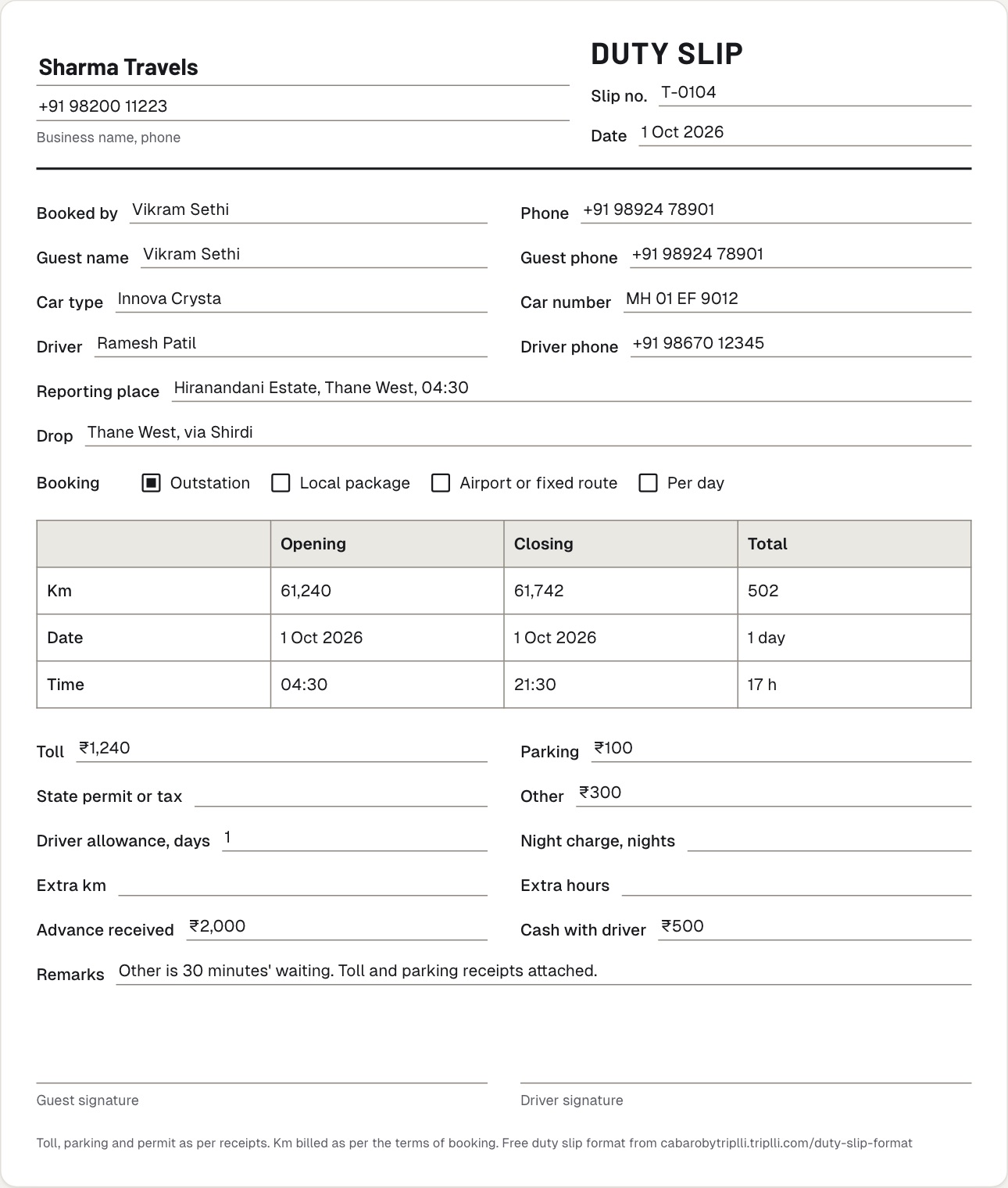
A duty slip, also called a trip sheet or log sheet, is the record of one duty of a hired car: who travelled, the car and driver, the reporting time, the opening and closing km, the start and end time, and the toll, parking and permit paid on the way. The guest signs it at the end, and the operator bills from it.
Fill it online
Fill the duty slip, then print or save it as PDF.
On a phone or a computer. Total km works itself out. What you type stays in this browser and is never sent to Cabaro; your business name is kept for the next slip.
Prints on one A4 page. To keep a PDF, pick Save as PDF in the print window.
Step by step
How to fill a duty slip.
The office fills the top before the car leaves; the driver fills the rest on the duty.
- Before the dutyThe office writes the slip number, the date, who booked, the guest, the car, the driver and the reporting place, and ticks the booking type.
- At the startThe driver writes the opening km and the start time, from the garage or from the pickup, as your terms say.
- On the wayEvery toll, parking and state permit paid is written down, and the receipt kept.
- At the endThe driver writes the closing km and the end time. Closing km minus opening km is the total km.
- Allowances and cashThe days for driver allowance, the nights for night charge, and any advance or cash the driver took.
- SignaturesThe guest checks the km and the time and signs. The driver signs. The slip and the receipts go to the office, and the bill is made from them.
Field by field
What goes on a duty slip, and why.
The bill is made from these fields, so fill every one.
- Duty slip number and date
- One number per duty, so a slip can be found when the customer asks about a bill months later.
- Booked by and guest
- Who booked and who travelled, with a phone number. For a company booking they are often different people.
- Car type and car number
- The category billed (Sedan, Innova Crysta, Tempo Traveller) and the plate of the car that went.
- Driver
- Name and phone of the driver on duty.
- Reporting place and time, drop
- Where and when the car reported, and where the duty ended.
- Opening and closing km
- The odometer at the start and at the end. Closing minus opening is the km billed. Whether that is from your garage or from the pickup is your terms' call: write it on the slip.
- Start and end time, with dates
- For hourly packages, the hours over the package are billed as extra hours. For outstation, the dates give the days for the minimum km and the driver allowance.
- Toll, parking, state permit
- Paid on the way and billed as actuals. Staple the receipts to the slip.
- Driver allowance and night charge
- Driver allowance (driver bata) a day and a night charge a night out, at your rates.
- Advance and cash collected
- What the customer paid before, and any cash the driver took, so the balance on the bill is right.
- Signatures
- The guest signs to agree the km and the time; the driver signs as the one on duty.
From slip to bill
A worked example.
The same slip, opening km 61,240, closing km 61,742, with toll, parking and 30 minutes' waiting. This is the bill Cabaro works out from it, at Sharma Travels' own rates.
| 502 km at ₹19 a km | ₹9,538 |
| Driver allowance, 1 day at ₹400 | ₹400 |
| Toll | ₹1,240 |
| Parking | ₹100 |
| Waiting | ₹300 |
| Total | ₹11,578 |
|---|---|
| Received, advance and cash with driver | ₹2,500 |
| Balance | ₹9,078 |
The duty slip in Cabaro
No slip to write. Cabaro makes one for every trip.
Each trip sends the driver a WhatsApp link. At the end they type the opening and closing km, toll, parking and permit on their own phone, with no app and no login. Cabaro makes the duty slip from the booking and those km: guest, car and number, driver, reporting place, dates, times and everything paid on the way, as a PDF to download. It also works out the bill from your price list, and you check every line before the customer sees it.
- A filled duty slip for every trip, as a PDF
- The bill worked out from your rates
- You review it before the customer sees it
The bill that comes after the slip, with or without GST: taxi bill format, free to print. Starting out: how to start a taxi business in India.
Cabaro
Software for cab, tempo traveller, bus and luxury car operators.

Taxi and cab operators
Sedans, SUVs and Innovas on airport runs, local packages and outstation trips.
Read more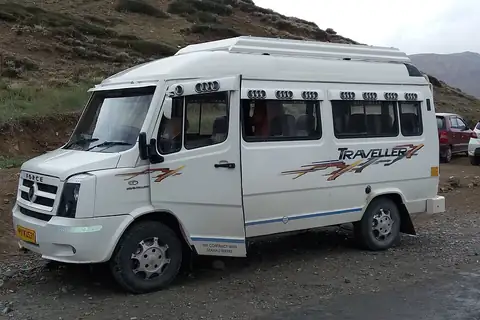
Tempo travellers and buses
39 group models from a 6 seater van to a 50 seater coach, for tours, weddings and yatras.
Read more
Luxury and wedding cars
49 luxury models, from a Mercedes E-Class to a Rolls-Royce, priced by the hour or on request.
Read more
Car rental with driver
Cars by the hour, by the day or by the km, with a bill worked out from your own package.
Read more
Is this duty slip format free?
Yes. Download the PDF, Word or Excel file, or fill it on this page and print it, as often as you like. Put your own business name on top. There is nothing to sign up for.
Is the duty slip format available in Word and Excel?
Yes. The Word file opens in Microsoft Word, Google Docs and WPS Office, so you can add your company name, logo and terms. The Excel file opens in Excel and Google Sheets and works out the total km and the extras for you; its second sheet is a filled sample.
Can a driver fill the duty slip on a phone?
Yes. Fill the slip on this page on any phone, then press Print or save PDF and send the PDF on WhatsApp. What you type stays in your own browser: nothing is sent to Cabaro. Your business name is kept for the next slip.
What is the difference between a duty slip and a trip sheet?
In most cab offices they are the same paper: the record of one duty with the km, the time and the extras, signed by the guest. Some operators call the driver's whole day a trip sheet and each booking in it a duty slip. A log sheet or log book is usually the car's own daily record of km, kept for the owner rather than the customer.
Garage to garage or point to point?
Garage to garage counts the km from when the car leaves your garage until it is back; point to point counts from pickup to drop. Both are used in India. Say which one you use in your terms, and write the opening and closing km to match.
Who signs the duty slip?
The guest signs to agree the km and the time, and the driver signs as the one on duty. For a company booking, the guest's signature is what the company's accounts team checks against your bill.
Does Cabaro make the duty slip for me?
Yes. Once the driver sends the km on their trip link, or you close the trip yourself, Cabaro fills the duty slip from the booking: guest, car and number, driver, reporting place, opening and closing km, dates, times, toll, parking and permit. Open it on the trip and download it as a PDF. Nothing is written by hand.
Does the customer sign in Cabaro?
No. In Cabaro the customer sees the bill on their own link, with every line, what is paid and the balance. If something looks wrong they press Something's wrong and leave a note for you. You see their note and sort it out with them.
Can I change the bill after the driver closes the trip?
Yes. You check the bill before the customer sees it, and you can edit any line or add one. The original stays visible beside your edit.
Inquiries keep coming in while you sleep.
No website needed: your Cabaro link is your website. Customers send trips at midnight; you send the price in the morning, on WhatsApp. Tell us your city and how many cars you run, and we will show you Cabaro on a call.